How to Preheat the Oven
Before you begin
Make sure:
▪ The oven is turned on.
▪ The oven door is closed.
Procedure
To preheat the oven, do the following.
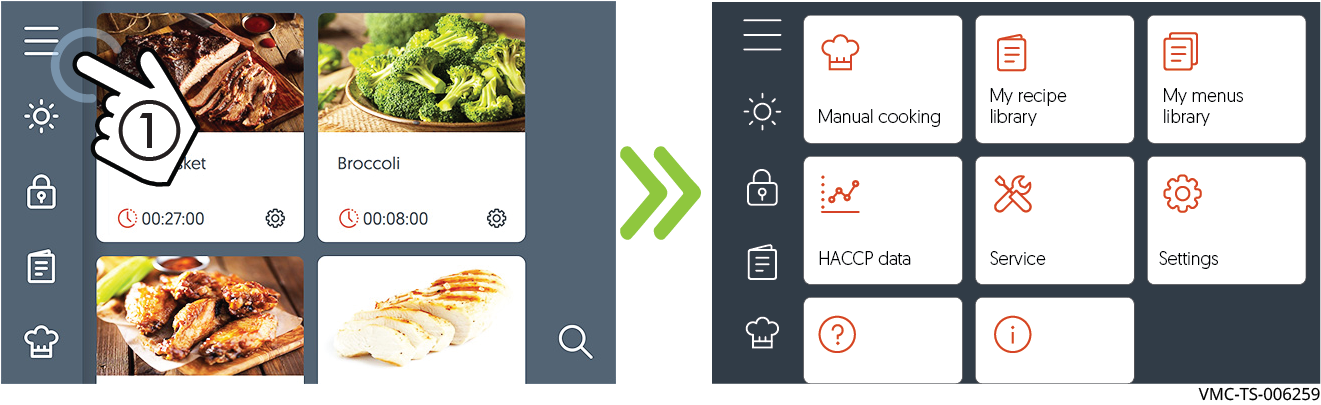
1. Touch the menu icon ①. The menu screen displays.
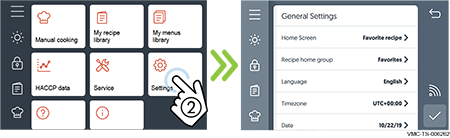
2. Touch the Settings icon ②. The general settings screen displays.
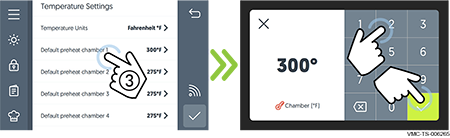
3. Scroll to the Temperature Settings.
Touch the preheat chamber setting ③. The existing temperature displays. Enter the preheat temperature using the number pad. Touch the check mark.
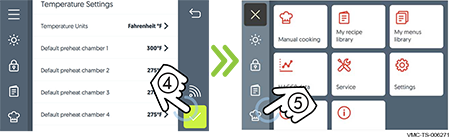
4. Touch the check mark ④ to save the preheat temperature settings.
Touch the manual cook icon ⑤ to return to the manual cook screen.
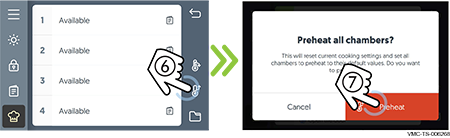
5. Touch the preheat icon ⑥. The preheat all chambers confirmation screen displays.
Touch “Preheat” ⑦. All chambers start to preheat to their preset temperatures.
Screen loading bars
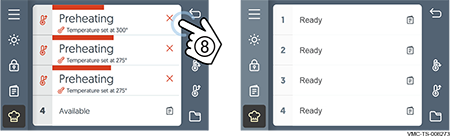
Red loading bars indicate each chamber’s progress towards reaching its set temperature.
Touch the cancel icon ⑧ to cancel the preheating process before the individual chamber reaches its preset preheat temperature. Each chamber must be canceled individually.
Result
The oven is preheating. When the preheat process is complete, the screen displays Ready for each chamber.